A landing page is one of the most powerful tools your business can have online.
Unlike a regular website page, a landing page has one job — to convert visitors into leads, customers, or clients.
The problem? Most landing pages fail. They look nice but do not convert.
In this guide, we will show you exactly how to create a high-converting landing page in 2026 — step by step.
1. What is a Landing Page?
A landing page is a standalone web page designed for one specific goal — getting visitors to take one action.
That action could be:
- Filling out a contact form
- Buying a product
- Signing up for a newsletter
- Booking a free consultation
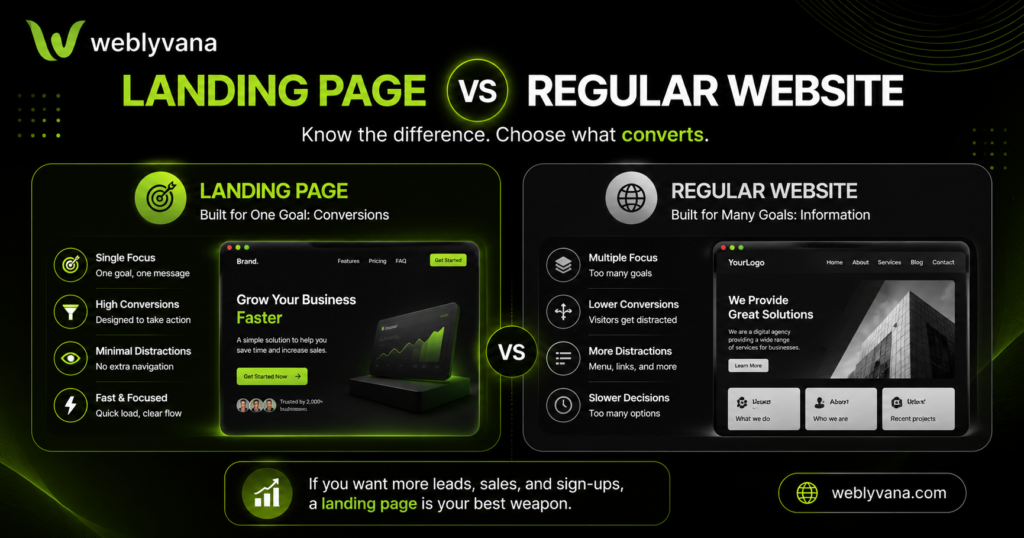
The key difference between a landing page and a regular website page:
| Landing Page | Regular Page | |
|---|---|---|
| Goal | One specific action | General information |
| Navigation | No menu (usually) | Full navigation |
| Distractions | Zero | Many |
| Conversion rate | High | Low |
 Pro Tip: Remove the navigation menu from your landing page — every extra link is a distraction that takes visitors away from your goal.
2. What Makes a Landing Page High-Converting?
Before we get into how to build one, let us look at what separates a high-converting landing page from one that fails.
The 5 elements every high-converting landing page needs:
Element 1 — A Strong Headline
Your headline is the first thing visitors see. It needs to communicate your value in 5-10 words.
- ❌ Bad: “Welcome to Our Website”
- ✅ Good: “Get a Professional Website Live in 5 Days — Starting $99”
Element 2 — A Clear Sub-headline
Support your headline with one sentence that adds more detail.
Element 3 — Social Proof
Reviews, testimonials, client logos, or case studies. People trust other people — not businesses.
Element 4 — One Clear CTA (Call to Action)
One button. One goal. Do not confuse visitors with multiple options.
- ❌ Bad: “Learn More | Contact Us | See Pricing | View Portfolio”
- ✅ Good: “Get a Free Consultation”
Element 5 — Fast Load Speed
If your landing page takes more than 3 seconds to load — visitors leave. Speed is everything in 2026.
3. How to Structure a High-Converting Landing Page
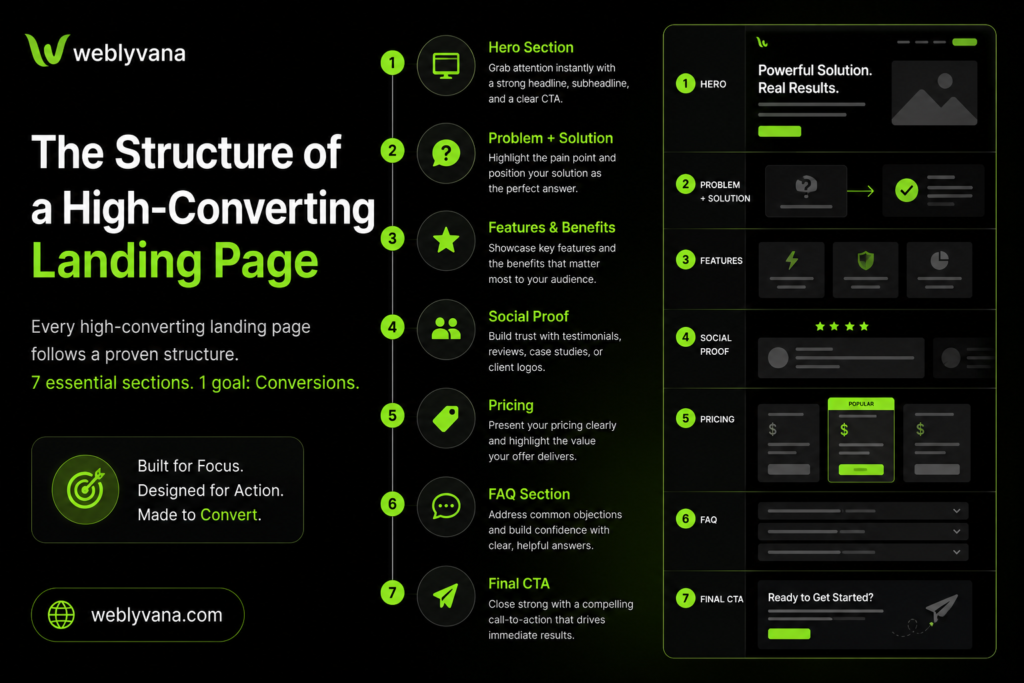
Follow this exact structure for maximum conversions:
Section 1 — Hero Section (Above the Fold)
- Strong headline
- Sub-headline
- One CTA button
- Hero image or mockup
Section 2 — Problem + Solution
- Identify the visitor’s pain point
- Present your service as the solution
Section 3 — Features & Benefits
- What you offer (features)
- Why it matters to them (benefits)
- Use bullet points — easy to scan
Section 4 — Social Proof
- Client testimonials
- Star ratings
- Case studies or before/after
Section 5 — Pricing (Optional)
- Show starting price
- Keep it simple — no confusion
Section 6 — FAQ
- Answer the top 5 objections
- Removes doubt before they contact you
Section 7 — Final CTA
- Repeat your call to action
- Add urgency if possible: “Get a free consultation today”
💡 Pro Tip: Put your most important CTA button above the fold — visitors should not have to scroll to find it.
4. Landing Page Design Tips for 2026
Design matters as much as content. Here are the key design rules:
✅ Use white space — do not crowd your page. Less is more.
✅ One color for CTA buttons — make your button stand out. Use a contrasting color.
✅ Mobile first — over 60% of traffic comes from mobile in 2026. Design for mobile first.
✅ Use real images — avoid generic stock photos. Real team photos and real client results convert better.
✅ Keep fonts simple — use maximum 2 fonts. One for headings, one for body text.
✅ Use directional cues — arrows, images of people looking at your CTA button guide the eye.
5. Landing Page Mistakes to Avoid
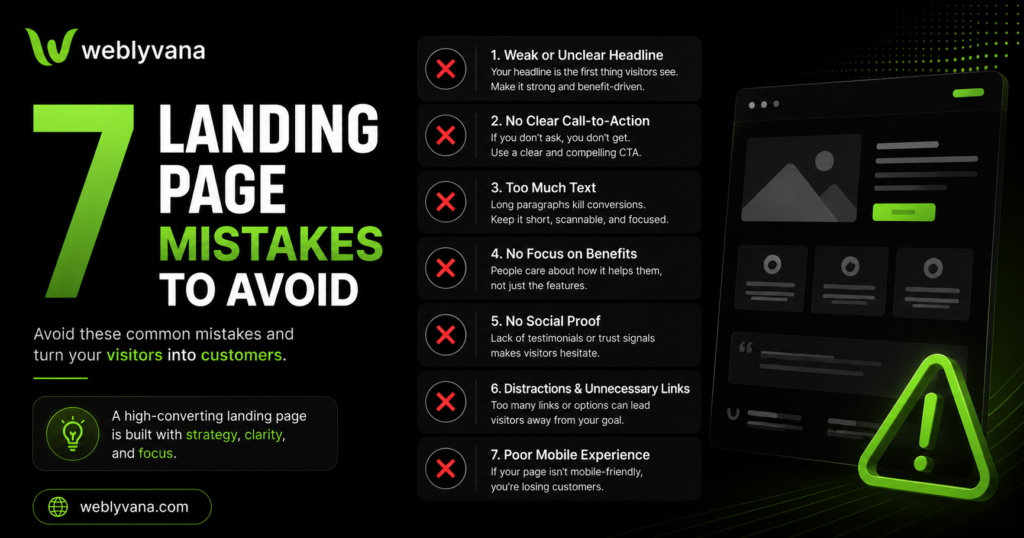
These mistakes kill conversions — avoid them at all costs:
❌ Too much text — visitors scan, they do not read. Use short paragraphs and bullet points.
❌ Multiple CTAs — one goal, one button. Multiple CTAs confuse visitors.
❌ No social proof — without testimonials or reviews, visitors do not trust you.
❌ Slow load speed — every second of delay reduces conversions by 7%.
❌ No mobile optimization — if your landing page looks bad on mobile, you are losing more than half your visitors.
❌ Weak headline — if your headline does not grab attention in 3 seconds, visitors leave.
❌ No clear CTA — visitors need to know exactly what to do next. Make it obvious.
6. Tools to Build a Landing Page in 2026
You have two main options:
Option 1 — DIY with a Website Builder
Build it yourself using:
- WordPress + Elementor — most flexible, best for SEO
- Shopify — best for ecommerce landing pages
- Wix — beginner friendly but limited
Best hosting for your landing page:
We recommend Hostinger — fast servers, affordable pricing, and one-click WordPress install.
🔗 Get Hostinger hosting — starting from $2.99/month
Option 2 — Hire a Professional
If you want a landing page that is designed to convert from day one — hire a professional web designer.
At Weblyvana, we build high-converting landing pages starting from just $99 — mobile-friendly, fast, and delivered in 5 days.
7. How to Drive Traffic to Your Landing Page
A great landing page is useless without traffic. Here are the best free ways to get visitors:
📱 Social Media — share your landing page link on Facebook, Instagram, and LinkedIn
📧 Email Marketing — send your landing page to your email list
🔍 SEO — optimize your landing page for a specific keyword so it ranks on Google
💬 WhatsApp & Direct Outreach — share your landing page link directly with potential clients
📝 Blog Posts — write helpful blog posts and link to your landing page as the next step
Frequently Asked Questions
How long should a landing page be?
It depends on your goal. For simple lead generation — keep it short (500-800 words). For complex products or services — longer pages with more detail convert better.
Do I need a separate domain for my landing page?
No — you can host your landing page on your existing domain as a separate page. For example: yourwebsite.com/free-consultation.
How much does a landing page cost?
A DIY landing page can cost as little as $0 if you use a free website builder. A professionally designed landing page starts from $99 at Weblyvana — built to convert from day one.
What is the average conversion rate for a landing page?
The average landing page converts at 2-5%. A well-optimized landing page can convert at 10-15% or higher.
Does my landing page need SEO?
Yes — if you want organic traffic from Google. Make sure your landing page targets a specific keyword, has a proper meta title and description, and loads fast.
WordPress or Shopify for a landing page?
WordPress with Elementor gives you the most flexibility and best SEO. Shopify is better if your landing page is for an ecommerce product.
Conclusion
A high-converting landing page is not about fancy design — it is about clarity, trust, and one clear goal.
Follow the structure in this guide, avoid the common mistakes, and your landing page will start converting visitors into clients.
Need a professionally built landing page that actually converts?
At Weblyvana, we build high-converting landing pages starting from just $99 — mobile-friendly, SEO optimized, and delivered in 5 days.
🔗 Get a free consultation today
🔗 See our Landing Page Design packages — starting from $99
🔗 Need a full business website too? Check our Business Website Design service
💬 WhatsApp us directly: wa.me/447478058519