Your domain name is your business address on the internet.
It is the first thing people see when they find you online — and it can make the difference between someone trusting your business or clicking away.
The good news? Choosing the right domain name is not complicated — if you know what to look for.
In this guide, we cover everything you need to know about how to choose a domain name for your business in 2026 — from picking the right extension to avoiding costly mistakes that hurt your brand.
Let’s get started.
1. What is a Domain Name?
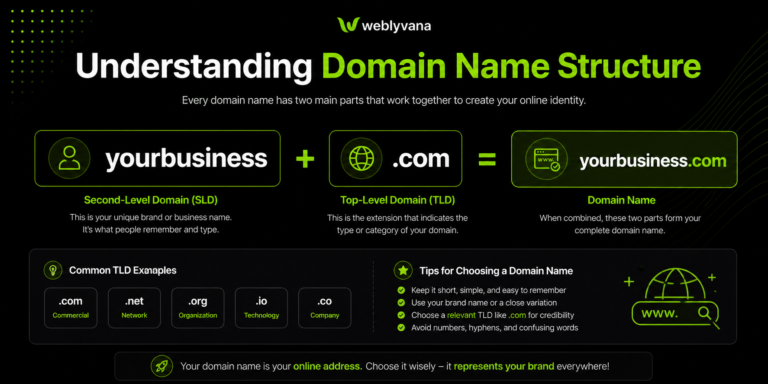
A domain name is the address people type to visit your website — for example, weblyvana.com or yourstore.com.
Every website on the internet has a domain name. Without one, your business has no online address — and no online address means no online presence.
A domain name has two parts:
- The name itself — e.g. “weblyvana”
- The extension — e.g. “.com”, “.co.uk”, “.store”
💡 Pro Tip: Your domain name is separate from your hosting. You can buy a domain from one provider and hosting from another — or get both in one place to keep things simple.
2. How to Choose the Right Domain Name — 7 Golden Rules
Follow these 7 rules and you will never go wrong with your domain name:
Rule 1 — Keep it Short and Simple
The best domain names are short, easy to type, and easy to remember. Aim for 6-14 characters maximum.
- Good:com, zoom.us, weblyvana.com
- Bad:com
Rule 2 — Make it Easy to Spell and Pronounce
If someone hears your domain name, they should be able to spell it correctly. Avoid unusual spellings, numbers, and hyphens.
⚠️ Warning: Never use numbers or hyphens in your domain — e.g. “best-web-design-2026.com” looks unprofessional and is hard to remember.
Rule 3 — Use .com if Possible
.com is still the most trusted and recognized extension worldwide. If your .com is available — take it.
If .com is taken, here are good alternatives:
Extension | Best For | Trust Level |
.com | Any business — universal | ⭐⭐⭐⭐⭐ |
.co | Startups and tech companies | ⭐⭐⭐⭐ |
.net | Tech and network businesses | ⭐⭐⭐⭐ |
.co.uk | UK-based businesses | ⭐⭐⭐⭐ |
.store | Ecommerce stores | ⭐⭐⭐ |
.agency | Creative agencies | ⭐⭐⭐ |
.xyz | Avoid — low trust | ⭐ |
Rule 4 — Include a Keyword if Natural
If you can include a relevant keyword naturally, it helps with SEO and tells people what your business does.
- com — has keyword, tells what you do
- com — has keyword, memorable
- But never force it — “johnsmithwebdesignservicespakistan.com” is too long
Rule 5 — Avoid Trademarked Names
Never use brand names like “shopify”, “wordpress”, or “amazon” in your domain. This can lead to legal issues and your domain being taken down.
Rule 6 — Check Social Media Availability
Before buying your domain, check if the same name is available on Facebook, Instagram, and other platforms you plan to use.
💡 Pro Tip: Use namecheckr.com to check domain and social media availability for a name all at once.
Rule 7 — Buy it Immediately
Good domain names get taken fast. If you find one you like and it fits all the rules — buy it today, not tomorrow.
3. Domain Name Ideas — How to Come Up With a Good One
Stuck on what to name your domain? Try these approaches:
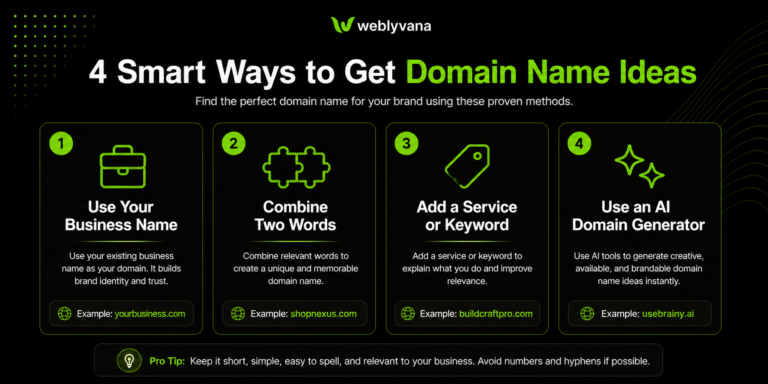
Use Your Business Name
The simplest approach — if your business name is available as a .com, use it. Example: yourbakery.com, yourlaw firm.com.
Combine Two Words
Combine a relevant word with your niche or location.
- com — fresh + cart
- com — quick + store
- com — bold + agency
Use Your Name + Service
Great for freelancers and personal brands.
- com
- com
- com
Use an AI Domain Generator
Tools like Hostinger AI Domain Generator can suggest available domain names based on your business description.
“Try Hostinger AI Domain Generator — find your perfect domain name here.”
4. Where to Buy Your Domain Name in 2026
You can buy domain names from many providers. Here is a comparison:
Provider | Price/Year | Why Choose |
Hostinger | From $1.99 | Cheapest, includes free email, easy to use |
Namecheap | From $8.99 | Good for domain-only purchase |
GoDaddy | From $11.99 | Popular but expensive renewals |
Google Domains | From $12 | Simple but pricey |
Shopify | From $14 | Convenient if using Shopify |
Our recommendation: Buy your domain from Hostinger — it is the most affordable option starting from just $1.99/year, and you can get your domain and hosting in one place which makes management much easier.
🔗 “Get your domain name from Hostinger — starting from $1.99/year.”
💡 Pro Tip: Always buy your domain for at least 2 years — Google trusts older domains more, and it protects you from forgetting to renew.
5. Domain Name Mistakes to Avoid
These are the most common domain name mistakes that hurt businesses:
❌ Choosing a name that is too long: If people cannot remember it or type it easily, you are losing visitors.
❌ Using hyphens: best-web-design.com looks spammy. bestwebdesign.com is much better.
❌ Copying a competitor: Never use a name similar to a big brand — you will lose visitors and possibly face legal action.
❌ Ignoring renewals: Set your domain to auto-renew. Many businesses have lost their domain because they forgot to renew it.
❌ Buying from your web developer: Always buy your domain in YOUR own account — never let someone else own your domain for you.
❌ Choosing a trendy name over a timeless one: Trends fade. Choose a name that will still make sense in 10 years.
❌ Not checking for trademark conflicts: Google your domain name before buying — make sure no big brand uses it.
6. Do You Need Multiple Domain Extensions?
Many businesses buy multiple domain extensions , for example, both mybusiness.com and mybusiness.co.uk.
Should you do this?
Buy multiple domains if:
- You serve multiple countries — e.g. UK and USA
- Your .com is taken but you want to protect your brand
- You want to prevent competitors from registering similar names
Not necessary if:
- You are just starting out — one domain is enough
- Your budget is limited — focus on one strong domain first
💡 Pro Tip: If you buy multiple domains, redirect all of them to your main domain. Do not create separate websites for each — this confuses Google.
7. What Happens After You Buy Your Domain?
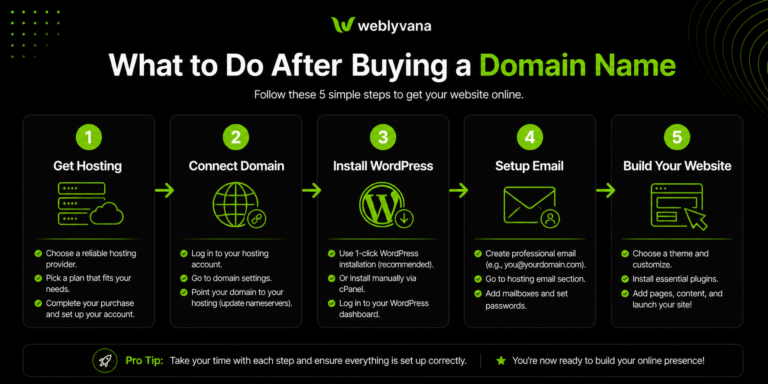
Once you have your domain, here are the next steps:
- Get web hosting — your domain needs a hosting plan to show a website
- Connect your domain to your hosting — usually automatic if bought from same provider
- Install WordPress or set up your store
- Set up a professional email — e.g. hello@yourdomain.com
- Build your website or hire a professional
Need help building your website after getting your domain?
🔗 “Contact Weblyvana for a free consultation — we will build your site from scratch.”
🔗 “See our Business Website Design packages — starting from $99.”
🔗 “Want an online store? Check our Shopify Store Setup service.”
Frequently Asked Questions
How much does a domain name cost?
Domain names typically cost $2–15/year. Hostinger offers domains from as low as $1.99/year — one of the cheapest options available.
Can I change my domain name later?
You can buy a new domain at any time, but changing your main domain means you lose your SEO history. Choose carefully from the start.
What is the best domain extension in 2026?
.com is still the best and most trusted extension worldwide. If .com is not available, .co or country-specific extensions like .co.uk are good alternatives.
Should my domain name match my business name?
Yes — ideally your domain name should match your business name exactly. This makes it easier for customers to find you and remember your address.
How long should a domain name be?
Ideally 6-14 characters. Shorter is better — easier to remember, type, and share.
Can I buy a domain without hosting?
Yes — you can buy a domain name separately and add hosting later. However, buying both together from Hostinger saves time and money.
What if my domain name is already taken?
Try adding a word like “get”, “try”, or your location. For example, if johnsstore.com is taken, try getjohnsstore.com or johnsstore.co.uk.
Conclusion
Choosing the right domain name does not have to be complicated.
Keep it short, make it memorable, use .com if possible, and buy it from an affordable provider like Hostinger.
The most important thing is to not overthink it. A good enough domain bought today is better than a perfect domain that you keep thinking about for weeks.
🔗 “Get your domain name from Hostinger today — starting from $1.99/year.”
Once you have your domain, the next step is building your website. At Weblyvana, we build professional WordPress and Shopify websites starting from just $99 — fast, mobile-friendly, and ready to grow your business.
🔗 “Get a free consultation today — tell us about your project.”